
In a CBT exam, you read each question on a computer screen and click your answer. A panel on the right, the question palette, shows the status of every question. Only answers you have saved are scored. A question you merely marked for review, with no answer saved, is not. NEET UG is reported to move to computer-based testing from 2027, so it is worth learning this screen before you meet it on exam day.
Key Takeaways
- The palette has five statuses: Not Visited, Not Answered, Answered, Marked for Review, and Answered and Marked for Review.
- NTA's CBT guidelines say an answered question is scored, even if you also marked it for review. A question marked for review with no answer is not scored.
- Clicking an option does not save it. Press Save & Next (or Save & Mark for Review, where the screen has it).
- After saving, check the palette. Green, or purple with a green mark, is scored.
- When the timer reaches zero, the exam ends by itself. You don't need to submit.
- NEET 2027's mode and screen are not notified yet. Check NTA's bulletin when it is out.
What is a CBT exam?
A CBT exam is a computer-based test. You sit at a computer at a test centre, read each question on screen and click the option you choose. There is no OMR sheet. The software records your answers and keeps the time.
NTA already runs several exams this way. Its CBT guidelines are in Appendix VIII of the JEE (Main) 2026 information bulletin (pages 59–64). They say the clock runs on a server and the countdown sits at the top right.
For NEET, NTA has not published a 2027 bulletin, so the NEET screen isn't confirmed. Our NEET 2027 exam pattern post tracks what is confirmed and what is only reported. Treat the rules below as NTA's standard CBT layout, not as a promise about NEET.
What do the question palette colours mean?
The question palette is the grid of question numbers on the right of the screen. Each number carries one of five symbols. NTA lists them on pages 60 and 62 of the bulletin above.
| Status | How it looks | What you did | Scored? |
|---|---|---|---|
| Not Visited | Grey box | Haven't opened the question | No |
| Not Answered | Red-orange tab, point down | Opened it, saved nothing | No |
| Answered | Green tab, point up | Saved an answer | Yes |
| Marked for Review | Purple circle | Flagged it, no answer saved | No |
| Answered and Marked for Review | Purple circle with a green dot | Saved an answer and flagged it | Yes |
Colour is not the only clue. The shapes differ too: a box, a pointed tab and a circle. The "Scored?" column follows NTA's wording (page 62, item 21). Answered questions count, and "Answered and Marked for Review" ones are "considered for evaluation".
Here is the same palette on a Cleartest mock. It's our own product, and the screen shows test data. Our screen draws the tabs as flags.
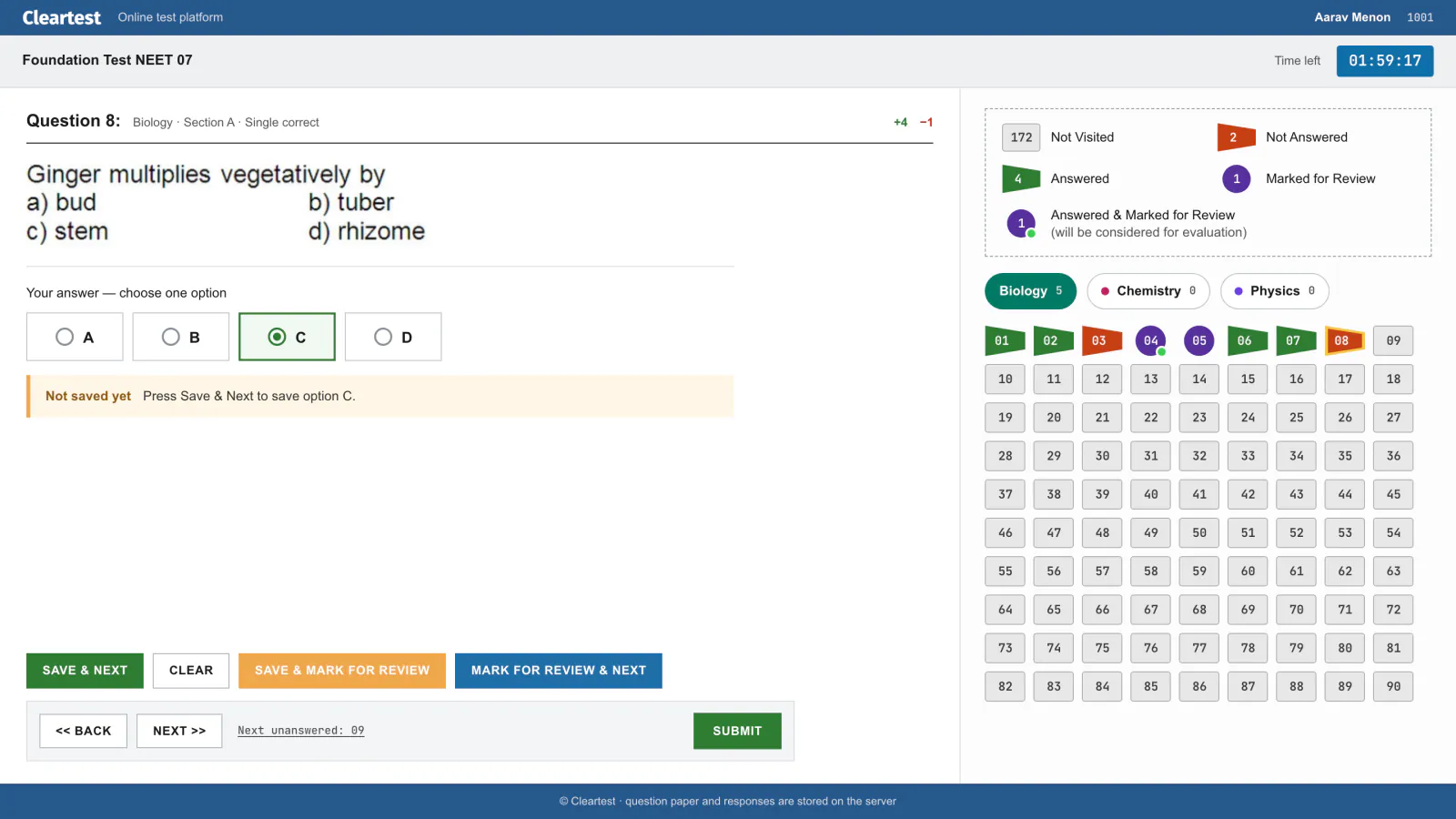
Look at question 8 in the grid. Its outline is highlighted because it is the question on screen. Option C is selected, but the yellow bar says "Not saved yet. Press Save & Next to save option C." That bar is there because clicking an option doesn't save it. NTA's screen has no such warning. On exam day, the palette colour is your only check.
Does Mark for Review count as an answer?
Not by itself. NTA states that a question marked for review without an answer "will not be considered for evaluation". If you answer a question and also mark it for review, the answer is considered for evaluation.
So Mark for Review is a reminder to yourself. NTA's own line is that the status "simply indicates that you would like to look at that question again" (page 60, item 4).
This causes a quiet mistake. You are unsure of a Physics numerical, so you flag it and move on, meaning to return. Time runs out. That question sits as a purple circle with no answer, and it earns zero. If you had saved your best guess with Save & Mark for Review, it would have counted.
Should you guess at all? NEET (UG) 2026 used +4 for a right answer, −1 for a wrong one and 0 for a blank, per the NTA 2026 bulletin (Chapter 4). Compared with leaving it blank, a right guess gains 4 marks and a wrong one loses 1. A guess between two options gains 1.5 marks on average. A pure guess among four gains only 0.25, and your score swings a lot. Decide your rule before the exam, not during it.
What is the difference between Save & Next and Mark for Review & Next?
Save & Next stores your answer and moves on. Mark for Review & Next is less certain, so don't rely on it to save. NTA's guidelines say in one line that it saves your answer, and in another that it marks the question "without answering it" (JEE Main 2026 bulletin, page 61).
The safe habit is simple. Use Save & Next, or a button labelled Save & Mark for Review. Then check the palette. Green, or purple with the green mark, means your answer is saved.
On our screen, the buttons are clear. Save & Mark for Review saves your answer and flags it. Mark for Review & Next only flags the question. A selection you haven't saved stays on screen but isn't scored. Check the labels in any mock you take, because wording varies between platforms.
Three more behaviours surprise first-timers:
- Clicking a question number in the palette does not save your answer. NTA says this option does NOT save your answer to the current question (page 60, item 8a). Press Save & Next first, then jump.
- Clear Response removes your selected option. You can also click the chosen option again to deselect it.
- To change a saved answer, open the question, press Clear Response as NTA's instructions ask, pick the new option and press Save & Next again (page 61, item 11).
What happens when the timer runs out?
The exam ends by itself. NTA says that when the timer reaches zero, the examination ends and you are not required to submit (page 60, item 2).
The clock runs on NTA's server, not your computer. If your computer or mouse fails, NTA gives you another one and adds the lost time back (page 62).
Two habits follow. Save each answer as you go, rather than saving in a rush at the end. And glance at the clock at fixed points. A time plan for 180 minutes is its own topic, and we'll cover it in a separate post.
How should you use the palette during a full paper?
Use it as a map, not a to-do list. A simple routine works for most students:
- First pass: answer what you know, press Save & Next, and move on. If a question is stuck, save your best option and flag it, or leave it as Not Answered.
- Second pass: open the purple circles first. These are your doubts, and any with a green dot are already safe.
- Last five minutes: look for grey boxes and red-orange tabs. Neither is scored. Each one is a chance to earn marks by answering, or to avoid a −1 by leaving it.
- Before time ends: scan the palette for every question you meant to answer. Each should be green, or purple with the green mark.
A note for parents: a student who knows these five symbols loses fewer marks to the screen itself. You don't need to buy anything for this. What helps is full mocks on a screen, so the layout feels ordinary by exam day.
Where can you practise on a CBT screen?
Practise on a screen that follows the same palette and buttons. NTA says a sample test is available on nta.ac.in for hands-on practice (page 59 of the bulletin above). You can also use our free NEET CBT mock test, which has the palette, mark for review, a live timer and +4/−1 marking. Our NEET 2027 CBT guide explains what a computer-based NEET could mean for you.
If you want a full series on this screen, try the AIIMS Toppers Test Series. It has 24 online tests, prepared and verified by NEET qualifiers selected into AIIMS. Take them with the palette open, and learn which colour means "scored" before it counts.
Read next
NEET 2027
NTA Mock Test for NEET: Free CBT Practice Options
Is there a free NTA mock test for NEET? Yes: NTA's Abhyas app is free. Here is what it offers, what to check, and other free ways to practise the CBT screen.
NEET 2027
NEET CBT Time Management: A 180-Minute Plan for the Screen
NEET CBT time management for 180 questions in 180 minutes: a subject-wise time budget, clock checkpoints and a simple log to tune the plan to your own speed.
CBT
NEET CBT Preparation for Coaching Institutes: A Term Plan
A term-by-term plan for NEET CBT preparation for coaching institutes: when to start screen mocks, how many to run, and how to review each one with a batch.